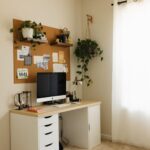


Creating a cozy and functional home workspace is more important than ever. Whether you work remotely full-time or occasionally take tasks home, having a dedicated area designed to meet your needs can boost productivity and improve well-being. In this post, we’ll explore practical tips to help you design a workspace that balances comfort with functionality.
Choose the Right Location
Selecting the best spot for your home office is the first step. Consider the following:
– Natural Light: Position your desk near a window if possible to take advantage of daylight. Natural light can enhance mood and energy.
– Quiet area: Pick a space that is reasonably free from household noise and distractions.
– Separate from living spaces: Avoid working in bedrooms or high-traffic areas to help create clear boundaries between work and relaxation.
Invest in Ergonomic Furniture
Comfort is key to maintaining focus and avoiding discomfort during long hours at your desk.
– Ergonomic chair: Choose a chair that supports the natural curve of your spine, with adjustable height and armrests.
– Desk height: Your desk should allow your elbows to rest at a 90-degree angle when typing. Adjustable desks or standing desk options can be beneficial.
– Monitor placement: Position your computer screen at eye level to reduce neck strain.
Organize for Efficiency
A cluttered workspace can interfere with productivity. Use these tips to keep things organized:
– Desk organizers: Use trays, trays, or compartments to keep pens, paper, and accessories tidy.
– Cable management: Use clips or covers to keep cables out of sight and prevent tangling.
– Storage solutions: Incorporate shelves, filing cabinets, or drawers to store documents and supplies away from your working surface.
Add Personal and Cozy Touches
A workspace should inspire you and feel inviting. Adding personalized elements can make your area more enjoyable.
– Plants: Indoor plants improve air quality and add a calming natural touch.
– Artwork: Display pictures or prints that motivate or relax you.
– Soft textiles: Consider a cushioned chair pad, a cozy throw blanket, or a soft rug to make the space warmer and more comfortable.
Optimize Lighting
Good lighting boosts both comfort and productivity.
– Layered lighting: Combine natural light with overhead fixtures and task lamps.
– Adjustable desk lamp: A lamp with adjustable brightness and direction helps reduce eye strain, especially during evening work.
– Avoid glare: Position screens and lights to minimize glare and reflections.
Manage Noise Levels
While silence isn’t always possible, there are ways to create a peaceful environment.
– Noise-cancelling headphones: These can help you focus when noise is unavoidable.
– Soft furnishings: Curtains, rugs, and cushions absorb sound and reduce echo.
– White noise machines: Using background sounds like white noise or nature sounds may improve concentration.
Maintain Good Air Quality and Temperature
Comfort includes the physical atmosphere around you.
– Ventilation: Ensure your workspace is well-ventilated. Fresh air helps keep you alert.
– Temperature control: Use fans, heaters, or air conditioning as needed to maintain a comfortable temperature.
– Air purifiers: For those sensitive to allergens or dust, an air purifier can be a great addition.
Establish Boundaries and Routine
Finally, a well-designed space works best when combined with good habits.
– Set working hours: Define your work schedule and try to stick to it.
– Keep the space for work: Avoid turning your workspace into a lounge or dining area to maintain a professional mindset.
– End-of-day routine: Take a moment to tidy your space and shut down your computer to signal the end of your workday.
—
Creating a home workspace that is both cozy and functional requires thoughtful planning but pays off in improved comfort and productivity. Tailor these tips to your personal style and needs, and enjoy a space that supports your best work every day.